
Add Repco Parts
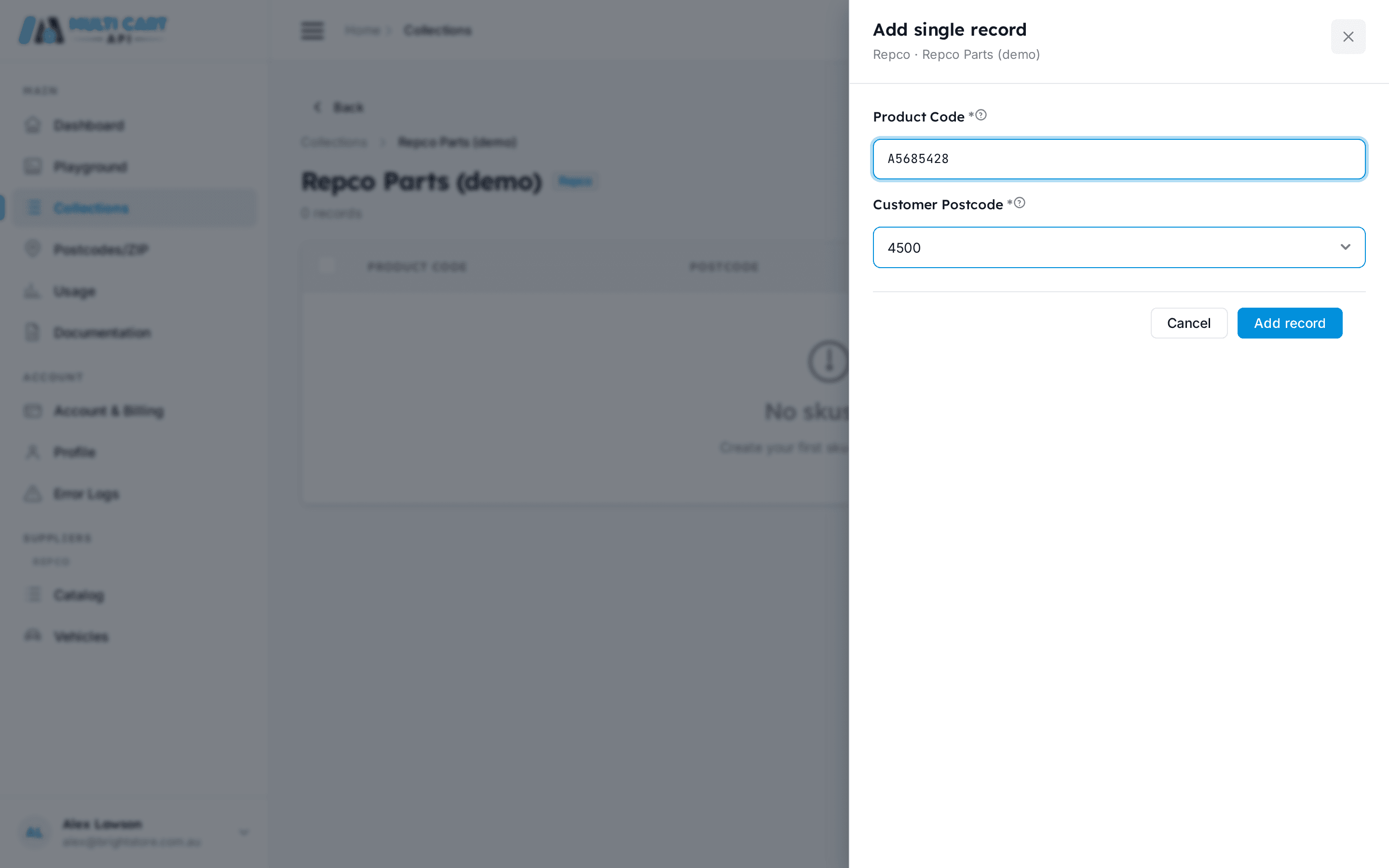
Repco products are identified by a product code (e.g. A5685428) paired with a customer postcode. Unlike Officeworks, Repco has no store field — the postcode alone resolves the nearest store, freight, and availability. This keeps adding parts simple: just the code and a postcode.
Before you start
You need two things in place before adding parts:
- A Repco collection — create one from the Collections page and set the supplier to
repco.com.au. See Create a Collection. - A postcode registered under the
repco.com.audomain. Repco postcodes activate immediately — no cookie generation. See Add a Postcode.
No store lookup required
There is no Repco stores endpoint and no store_id parameter. Where an Officeworks SKU needs sku + store_id + customer_postcode, a Repco part needs only sku + customer_postcode.
In the dashboard
- Open Collections from the sidebar and select your Repco collection.
- Click Add Parts and choose whether to add a single code or paste a comma-separated list.
- Enter the product code(s) and confirm the postcode.
- Click Save. The parts appear in the collection's item list immediately.
Adding many parts at once?
Use the bulk CSV upload described below. Each row in the CSV can target a different postcode, which is not possible from the comma-separated modal.
Via the API
Add a single part
Create Part
https://multicartapi.com/api/v1/schedules/repco/sku/create/| Parameter | Type | Required | Description |
|---|---|---|---|
collection | integer | Required | Collection ID. The collection must have request_type repco. |
sku | string | Required | Repco product code, e.g. A5685428. |
customer_postcode | string or integer | Required | 4-digit Australian postcode (e.g. 4500) or the integer ID of a Zipcode record. The server resolves either form against your registered repco.com.au postcodes. No store_id. |
curl https://multicartapi.com/api/v1/schedules/repco/sku/create/ \
-X POST \
-H "x-api-key: YOUR_API_KEY" \
-H "Content-Type: application/json" \
-d '{
  "collection": 100,
  "sku": "A5685428",
  "customer_postcode": 4500
}'{
"code": 200,
"data": {
"id": 77,
"sku": "A5685428",
"customer_postcode": "4500",
"collection": 100,
"created_at": "2026-07-10 10:00:00"
},
"status": 1
}First part activates the collection
Adding the first part to a Repco collection automatically promotes it from draft to enabled. Duplicate codes within the same collection are rejected — uniqueness is per collection + postcode. A collection holds at most 5,000 items.
Add multiple parts at once
Use this endpoint to add a batch of codes in a single call. All codes in the request share the same postcode.
Create Multiple Parts
https://multicartapi.com/api/v1/schedules/repco/sku/create/multiple/| Parameter | Type | Required | Description |
|---|---|---|---|
collection | integer | Required | Collection ID. |
skus | string | Required | Comma-separated product codes, e.g. A5685428,A8334587,R1234. |
customer_postcode | string | Required | Postcode number or Zipcode row ID applied to all codes in this request. |
curl https://multicartapi.com/api/v1/schedules/repco/sku/create/multiple/ \
-X POST \
-H "x-api-key: YOUR_API_KEY" \
-H "Content-Type: application/json" \
-d '{
  "collection": 100,
  "skus": "A5685428,A8334587,R1234",
  "customer_postcode": "4500"
}'{
"code": 200,
"data": {
"success_count": 2,
"error_rows": [
{ "sku": "R1234", "error": "SKU already exists in this collection." }
]
},
"status": 1
}Mixed postcodes
All codes in a single /create/multiple/ call share the same customer_postcode. To target different postcodes per part, make separate calls or use the bulk CSV endpoint below.
Bulk upload via CSV
Upload a CSV file when you want to add many parts, each potentially with a different postcode.
CSV format — include a header row with these exact column names (there is no store_id column):
sku,customer_postcode
A5685428,4500
A8334587,3000
R1234,2000
Postcode must be registered
Each customer_postcode value in the CSV must match an existing postcode registered under your account for the repco.com.au domain. Rows with an unresolvable postcode are skipped and reported in error_rows.
Bulk Create Parts (CSV)
https://multicartapi.com/api/v1/schedules/repco/sku/create/bulk/| Parameter | Type | Required | Description |
|---|---|---|---|
collection_id | integer | Required | Collection ID to add parts to. |
csv | file | Required | CSV file with header row: sku, customer_postcode. |
curl https://multicartapi.com/api/v1/schedules/repco/sku/create/bulk/ \
-X POST \
-H "x-api-key: YOUR_API_KEY" \
-F "collection_id=100" \
-F "csv=@/path/to/parts.csv"{
"code": 200,
"data": {
"success_count": 48,
"error_rows": [
{ "row": 12, "sku": "BADCODE", "error": "postcode 9999 is not associated with domain repco.com.au" }
]
},
"status": 1
}Next steps